
The PropsMadness Beginner's Guide: From Setup to First Bet in 5 Minutes
Most bettors waste hours jumping between stat sites, box scores, and sportsbooks trying to piece together whether a player prop is worth betting: performance data on one site, injury news on another, odds on a third. PropsMadness pulls everything into one place so you can research any prop in under 2 minutes.
This guide walks you through exactly how to use it, even if you have never used a prop research tool before. Most users are up and running within 5 minutes.
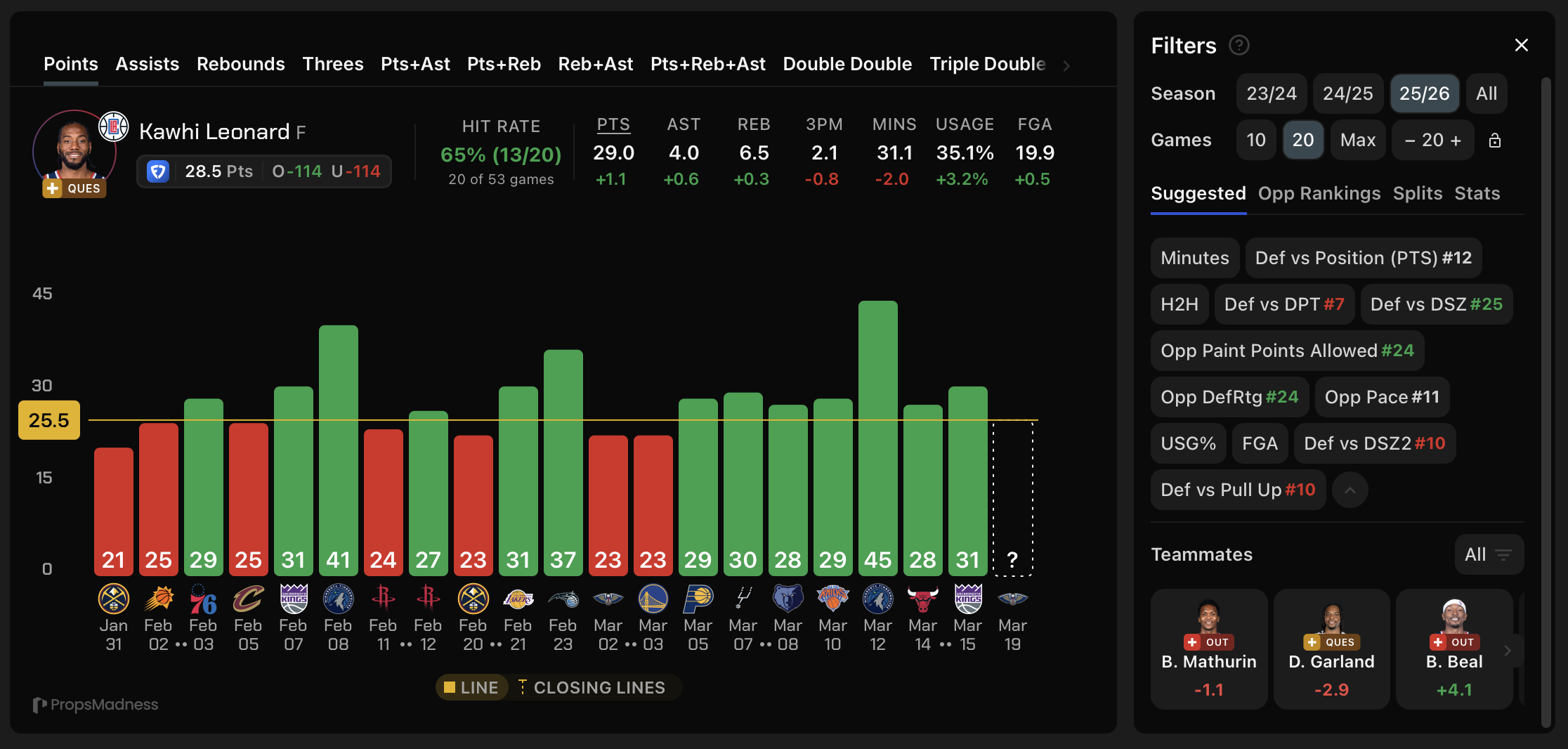
PropsMadness player dashboard with performance graph, filters, and injury data
What Is PropsMadness?
PropsMadness is a player prop betting tool that uses detailed analytics to help you evaluate betting opportunities across NBA, NFL, MLB, and WNBA games.
The platform breaks down complex player performance data and defensive matchups into easy-to-read visuals.
Key Features Overview
PropsMadness provides deep analytical tools that go far beyond basic stats.
NBA / WNBA
- Shooting zone breakdowns with opponent defense overlaid
- Shot type analysis (catch & shoot vs. pull-up)
- Play type tracking (12 categories)
- Expected minutes projections
- Real-time injury context and injury forecasting
- Similar player performance comparisons (how comparable players perform in the same matchup)
NFL
- Passing, rushing, and receiving splits
- Man vs. zone coverage data
- Target share breakdowns
The tool includes filters that let you narrow data by home/away splits, recent games, or specific opponents.
When you use these filters, the graphs and averages update instantly.
You can analyze multiple players per day for free. PropsMadness also offers an iOS app and an Android app so you can research props on your phone.
Watch the full PropsMadness walkthrough
Free vs Premium
You can analyze multiple players per day for free, even without an account. It is the best way to see if PropsMadness fits your research style before committing.
Most users start free and upgrade once they see how much time the advanced filters save.
| Free | Premium | |
|---|---|---|
| Player analysis | Multiple per day | Unlimited |
| Player cards | Limited | + Explore & Favorites |
| Filters | All (limited players) | All (all players) |
| Historical data | Full (limited players) | Full (all players) |
| Odds comparison | Limited | All 40+ sportsbooks |
| Discord community | No | Yes |
| Price | $0 | $25/mo or $250/yr |
Explore lets you swipe through all of today's player cards on mobile (premium). Favorites saves your tracked players for fast access (premium).
The yearly plan saves you $50 compared to paying monthly. Both plans come with a 7-day no questions asked refund policy.
Navigating the PropsMadness Dashboard
The PropsMadness dashboard puts all the tools you need in one place to analyze player props across multiple leagues.
You can switch between sports, find specific players, apply custom filters, and compare betting lines from 40+ sportsbooks.
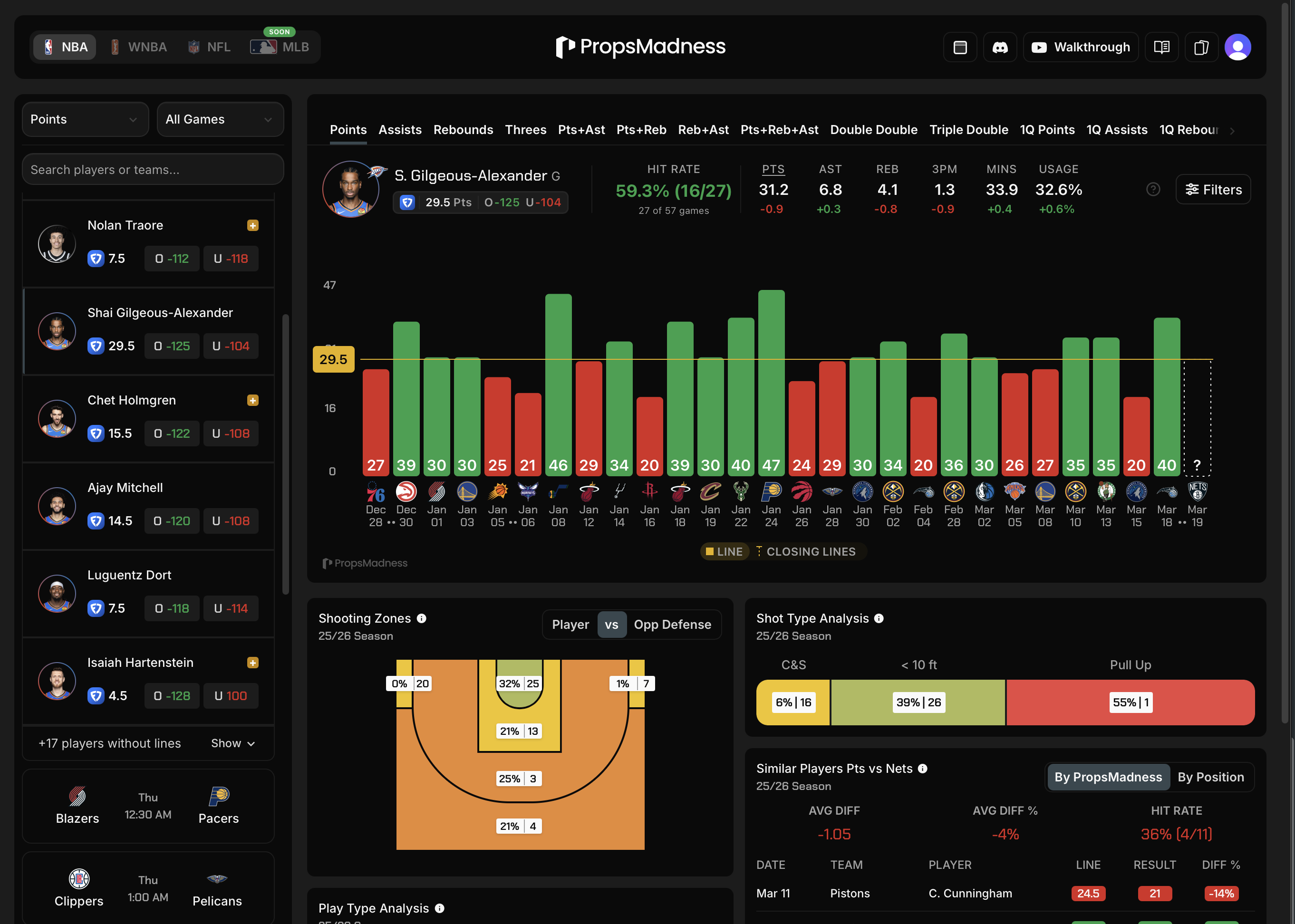
The full PropsMadness dashboard with player list, performance graph, and advanced analytics
Finding Your Player
When you land on PropsMadness, you will see tonight's games loaded automatically, no account needed. The left sidebar lists all players available for today's matchups, organized by game. On mobile, this appears as a bottom panel.
You can scroll through the list to browse players by game, or use the search bar to jump directly to a specific player across any league.
Reading the Player Page
Once you select a player, the dashboard displays a performance graph showing recent game results for the selected market. Averages update based on whatever filters you apply.
Key elements on the player page:
- Performance graph: visual game-by-game results with hover details for each matchup and the opponent's defensive ranking
- Averages and medians: shown for the filtered data set, with small differential numbers indicating how those averages shift compared to the full season baseline
- Hit rate: the percentage of games where the player went over the line, giving you a quick confidence check
- Expected minutes: hover over the next game on the graph to see the predicted playing time range for that player, which directly impacts prop potential
- Odds badge: shows your primary book's odds by default, with live odds from all your selected books behind a click dropdown
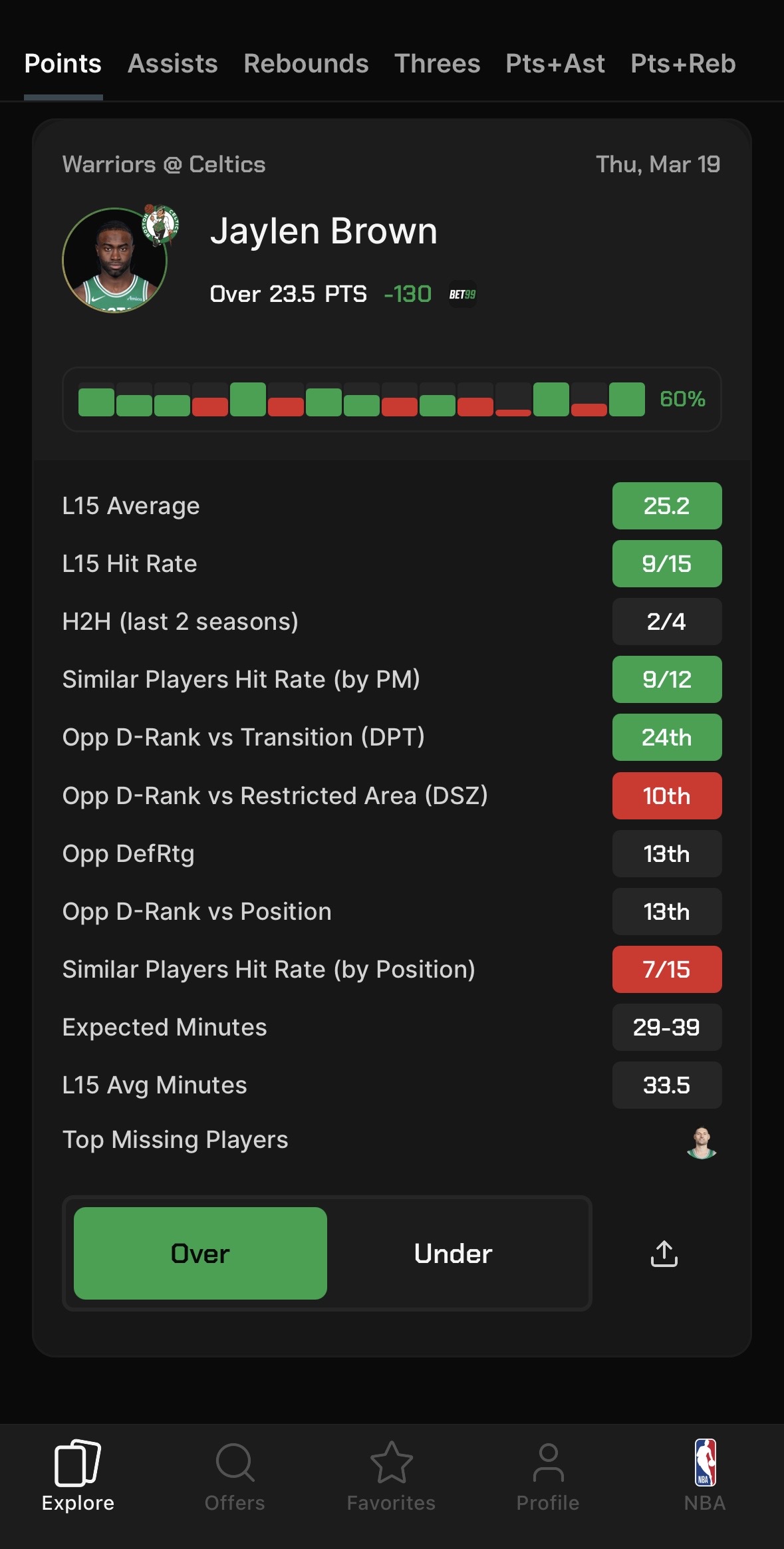
1. Find a matchup
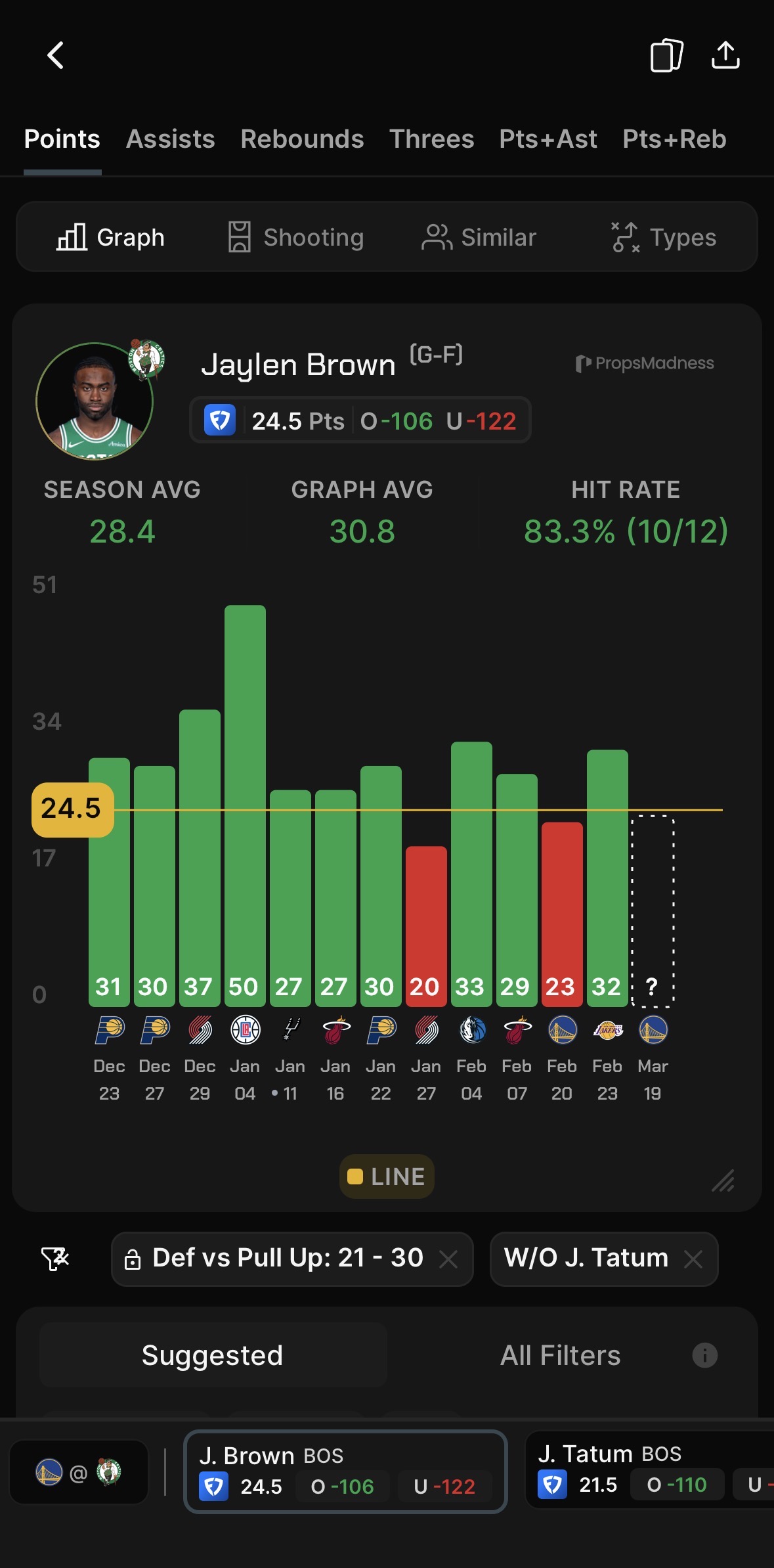
2. Apply filters and analyze
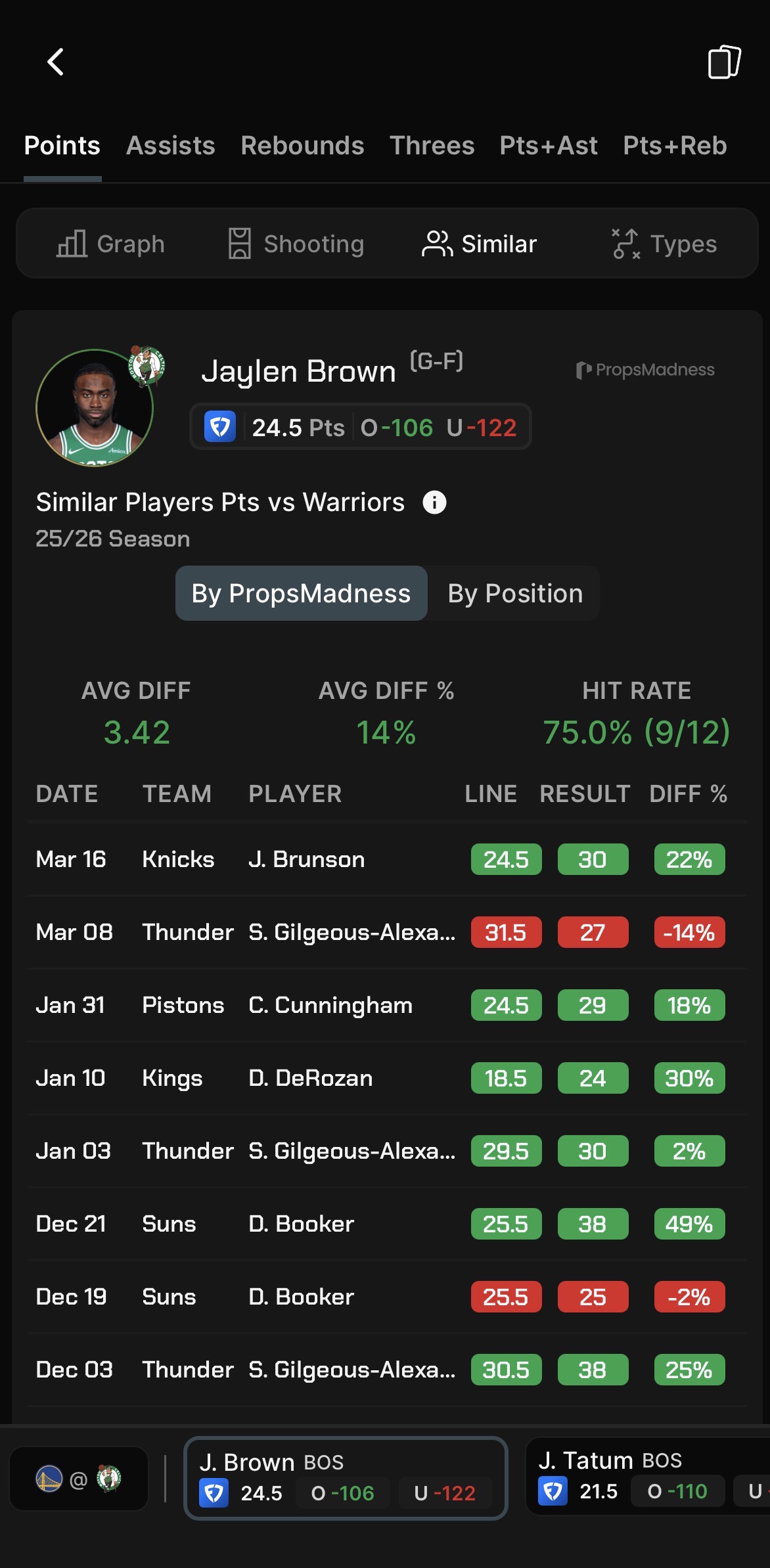
3. Check advanced data
Using Filters for Player Prop Research
Filters are what separate surface-level research from real player prop analysis. PropsMadness offers 50+ filters for NBA alone, and many can be toggled between full season rankings and recent game-time rankings (last 5, 10, or 15 games) for a more up-to-date picture.
Apply any filter and the entire page (graph, averages, hit rate) updates instantly.
Game & Player Context: Home vs. Away · Back-to-back · Date range · Head to head · Teammates in/out · Usage rate · Minutes
Defensive Matchup Filters: Opponent defense rank · Defense rank shortcuts (Best, Good, Bad, Worst) · Defense vs. position
Shot & Play Type Filters: Play type (isolation, pick & roll, spot-up, transition, and more) · Shot type (catch & shoot vs. pull-up) · Shooting zones (restricted area, mid-range, three-point)
Not sure where to start? The Suggested section surfaces the most relevant filters for each market automatically, so you do not have to dig through all 50+ options.
Once you are comfortable, stack multiple filters to build specific data sets. For example, "away games against top-10 defenses without a key teammate."
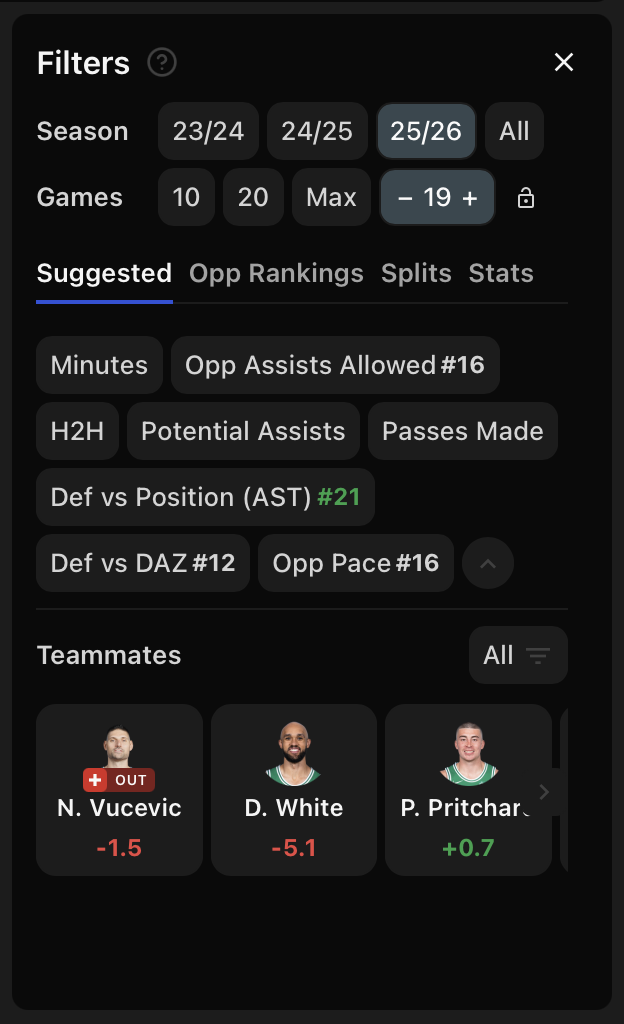
Suggested filters with teammate impact
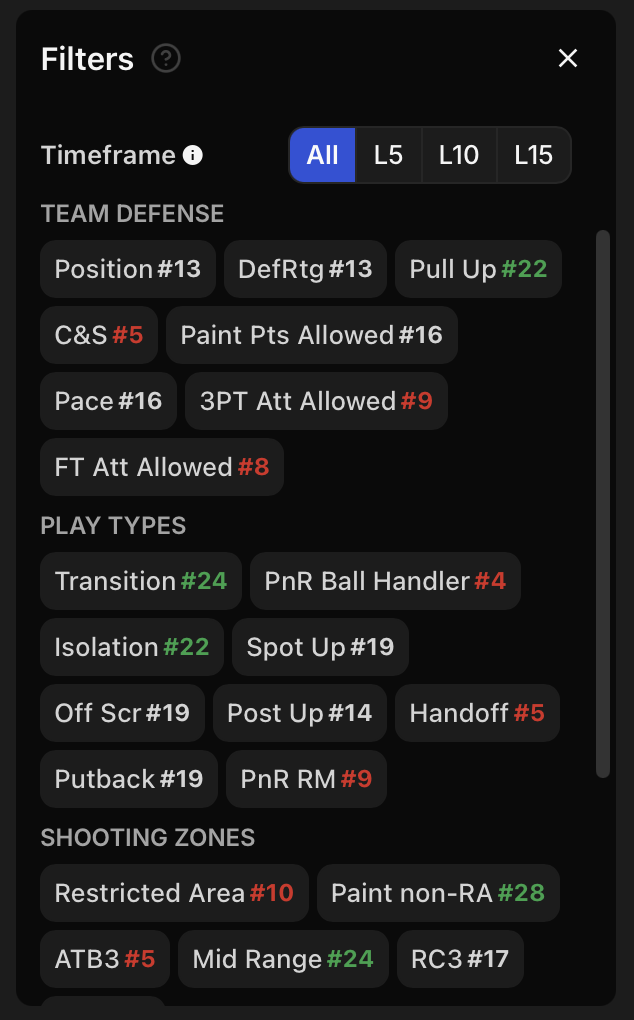
Opponent defense, play types, and zones
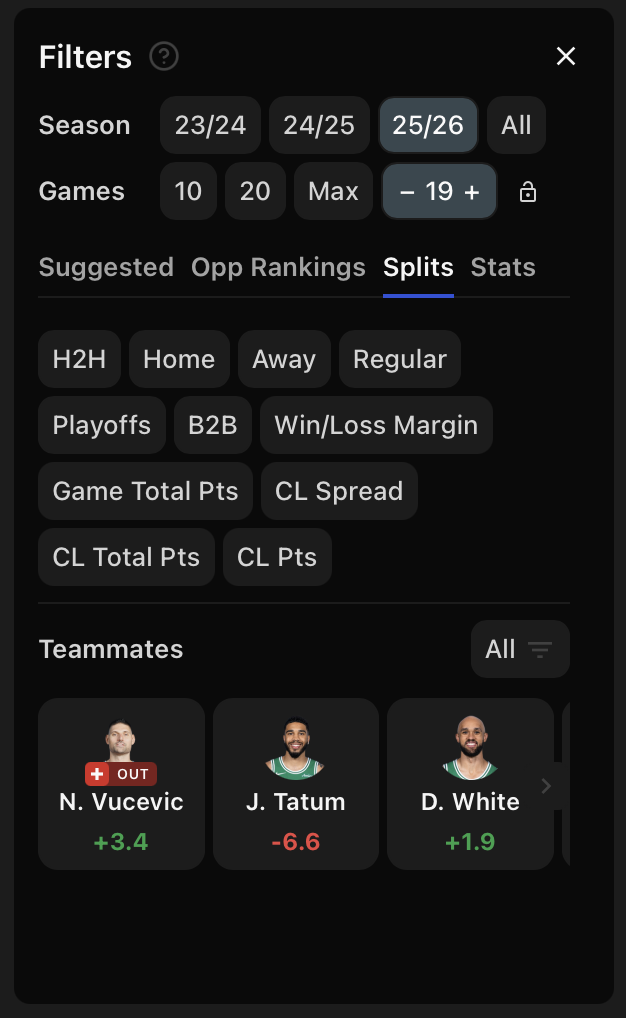
Splits, closing lines, and teammates
Comparing Odds Across 40+ Books
Click the odds badge on any player to see lines from every supported sportsbook side by side.
No more juggling four or five tabs. PropsMadness pulls all the data together automatically so you can spot which books offer the best lines for overs and unders.
Even small differences add up fast. The gap between -110 and -120 across 200 bets at $100 flat is roughly $2,500 annually, before any edge from better lines. Line shopping is not optional if you are serious. See exactly how much line shopping is worth →
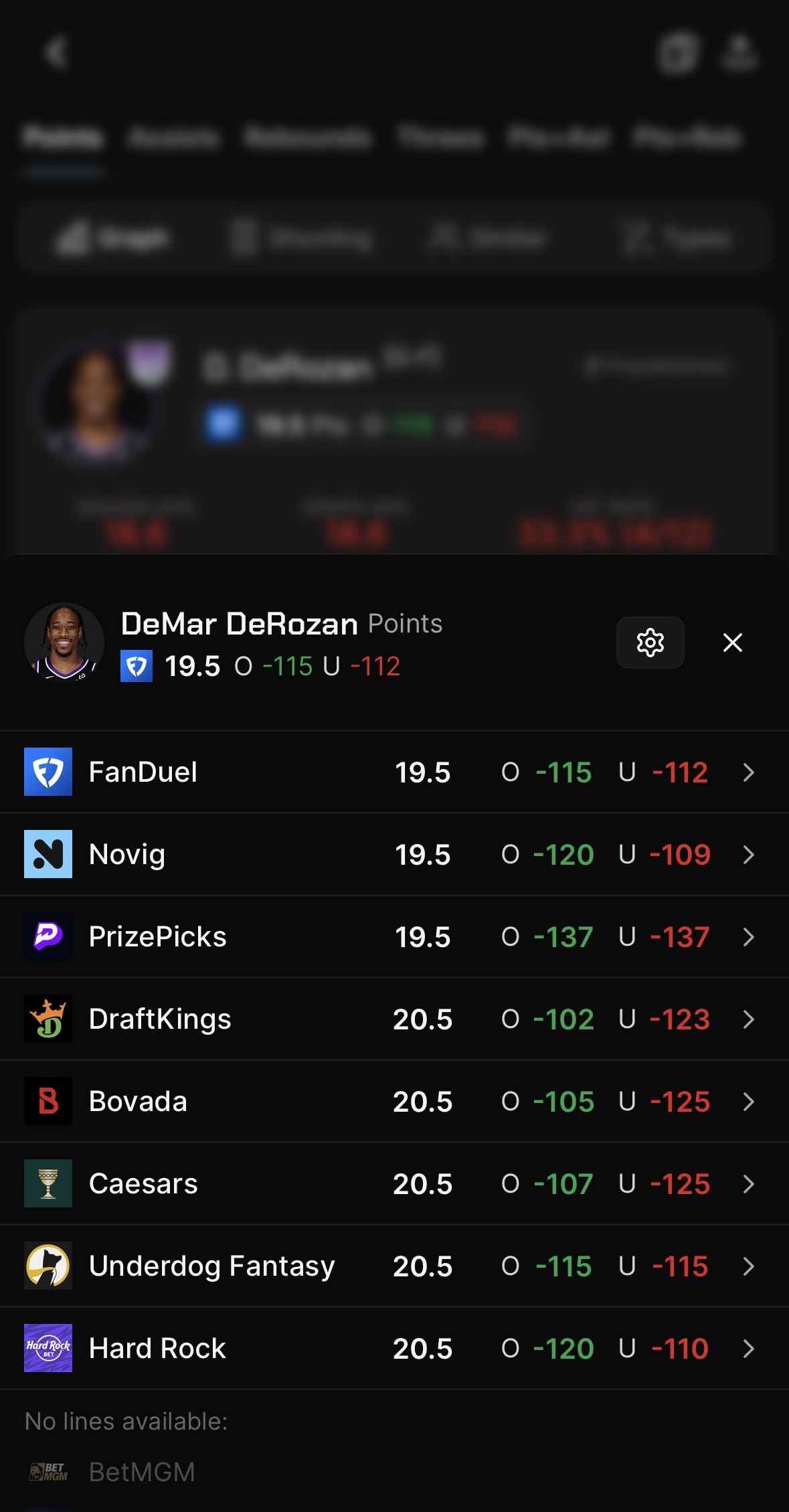
Choose up to 10 books from 40+ available, together with a primary book. Odds refresh in real time.
Advanced Visuals: Going Deeper
Below the main graph, PropsMadness offers a set of visual analysis tools you won't find on basic stat sites. These are the features that give you a real edge.
Shot Map (Basketball): An interactive court visualization broken into 6 zones: restricted area, in the paint, mid-range, left corner three, right corner three, and above the break three. Each zone is color-coded by efficiency, with opponent defense rankings overlaid so you can see where a player thrives and whether tonight's matchup favors them.
Shot Types: Catch & shoot vs. pull-up shooting splits, with court zone breakdowns for each. A player who thrives on catch & shoot threes will perform differently depending on who's creating shots for them.
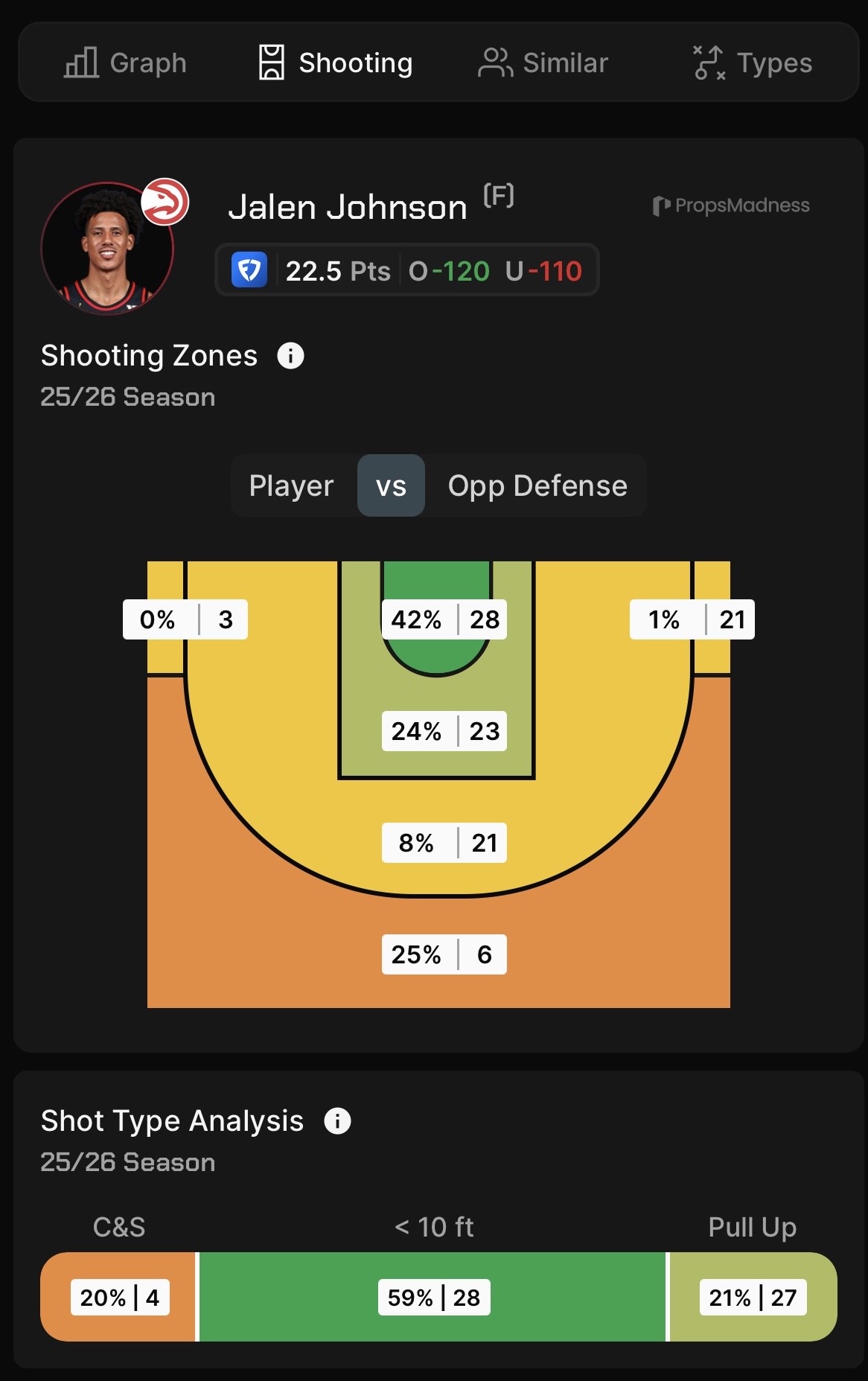
Shooting zones with opponent defense overlay and shot type breakdown
Play Types: 12 distinct play types tracked: transition, isolation, pick & roll (ball handler and roll man), post-up, spot-up, cut, handoff, putback, off-screen, and more. See which play types dominate a player's scoring and how efficient they are in each.
Assist Zones (Basketball): Where a player's passes end up on the court: restricted area, in the arc, corners, and above the break.
Man vs. Zone (NFL): Routes run, yards per route, and fantasy points allowed broken down by coverage type.
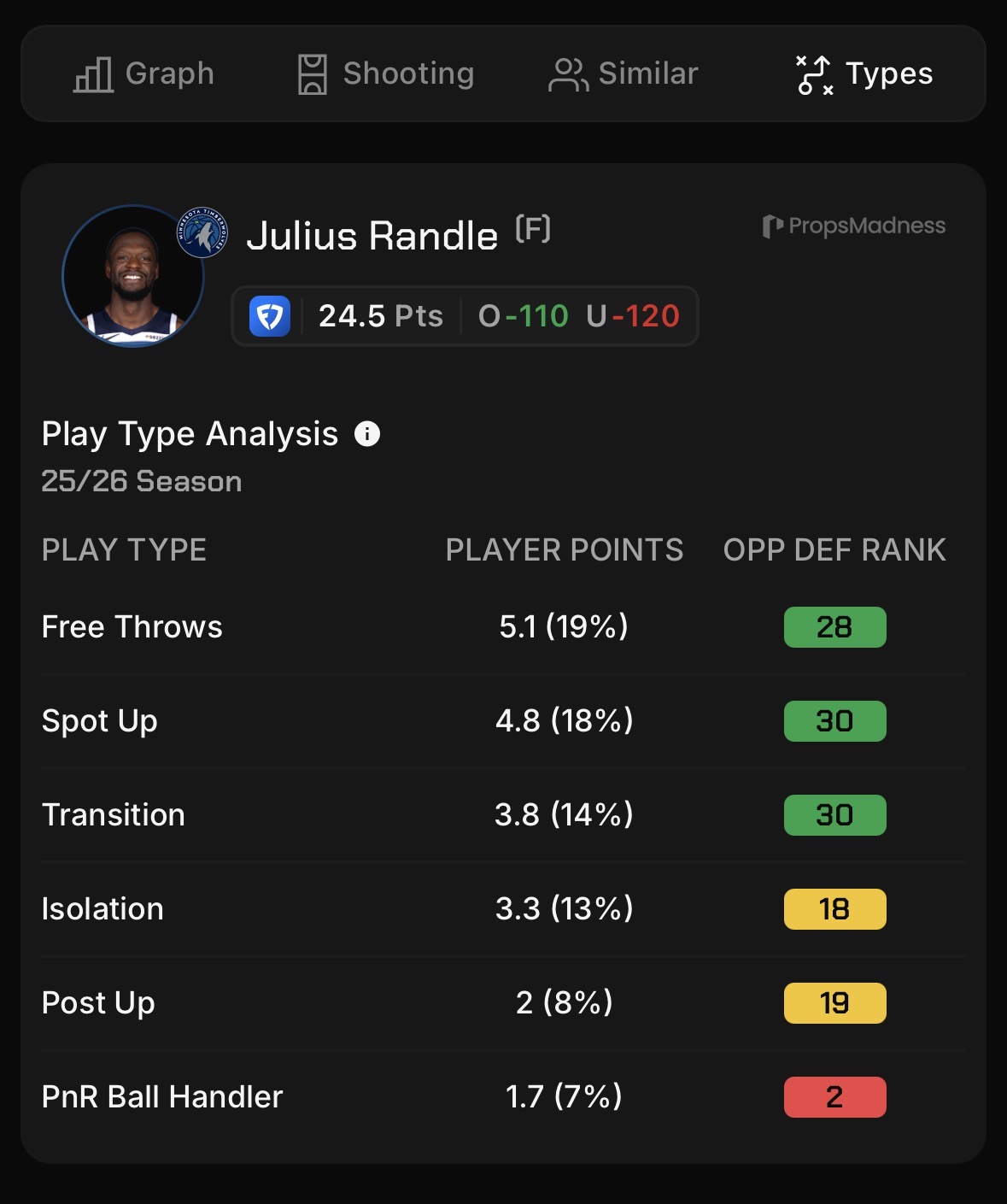
Play type breakdown with opponent defense ranking
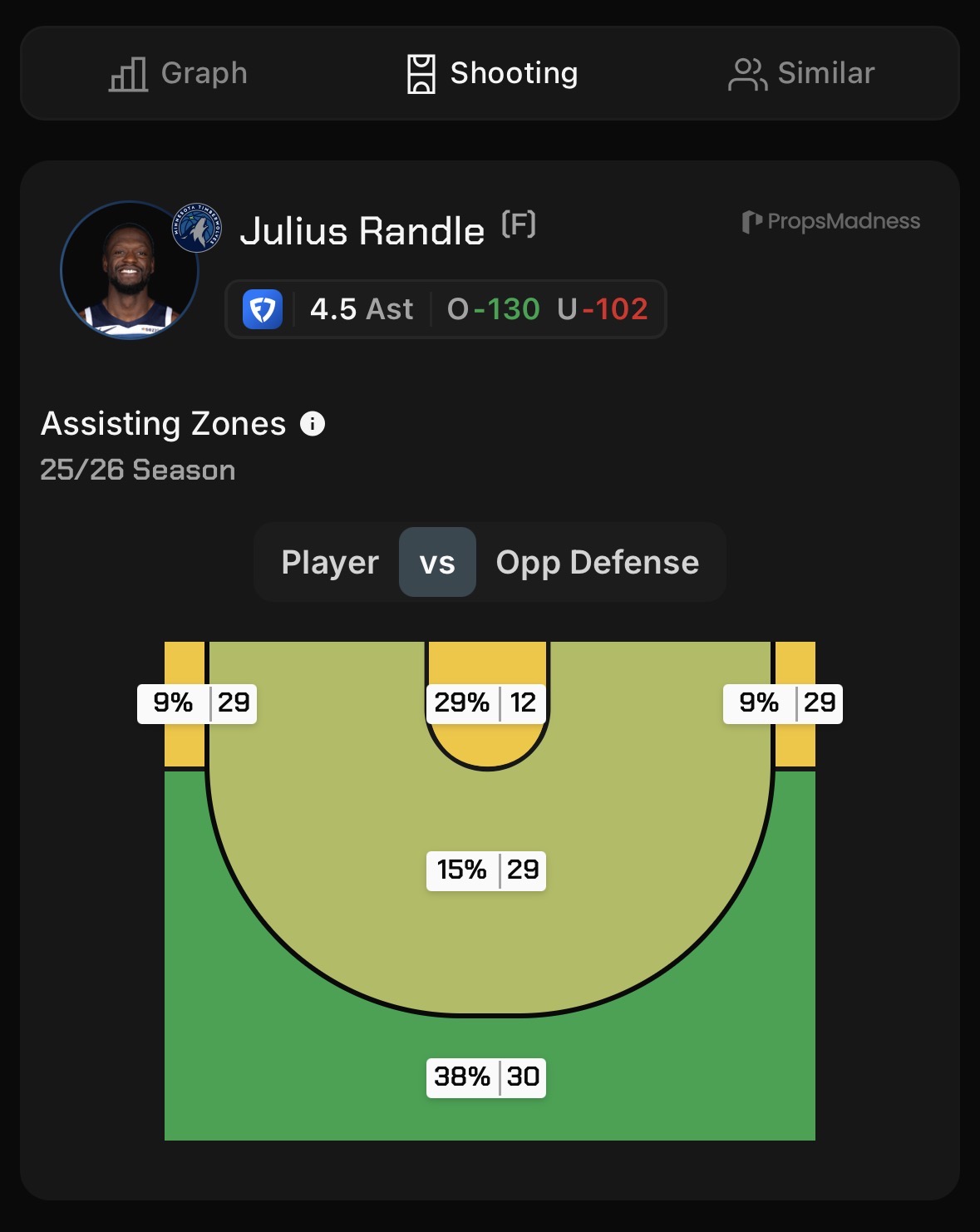
Assist zones with opponent defense overlay
Putting It All Together: A Sample Research Flow
Here's how a typical 2-minute research session looks on PropsMadness.
Let's say you're looking at an NBA points prop for tonight's game:
① Select a player: Click a player in the sidebar, use a player card on mobile, or search by name.
② Adjust expected minutes: The most important first step. Filter out outlier games where the player played significantly more or fewer minutes than projected tonight.
③ Check for injuries: Is a key teammate missing? Use the teammates filter to see how that impacts performance.
④ Check the matchup: Look at defense rankings, then dive into shooting zones, shot types, and play types for deeper context.
⑤ Apply relevant filters: Stack filters for more context: minutes, usage, play type, shot type, or head-to-head history.
⑥ Review the numbers: Check the hit rate, averages, and advanced visuals to see if they support the bet.
⑦ Compare odds: Find the best available line across 40+ books before placing anything.
For most props, expected minutes and matchup defense rank will tell you more than any other combination. Start there before going deeper.
Resources and Community
Join the Discord server to connect with other PropsMadness users. Members share research strategies, discuss features, and help each other find edges.
YouTube channel: Feature walkthroughs and real research examples. Useful if you learn better by watching than reading.
Help center: Detailed articles on every filter and feature, searchable by topic. Start here if you have a specific question.
Walkthrough video: A full overview of the platform in one sitting. Great for getting the big picture before diving in.
Frequently Asked Questions
What are the steps for beginners to start using PropsMadness?
Start by selecting any player from tonight's games in the left sidebar, no account needed. Check their expected minutes, apply the Suggested filters for your market, review the performance graph and hit rate, then compare odds before placing anything. Most users complete their first research session in under 5 minutes.
For a full walkthrough, the help center tutorial covers every feature in detail, and the video walkthroughs show the tool in action.
Does PropsMadness offer a free version?
Yes. You can analyze multiple players per day completely free, even without an account. Use it to explore the interface and see if PropsMadness fits your workflow before subscribing. If you do subscribe, there is a 7-day refund policy.
How do I access PropsMadness on mobile?
PropsMadness has an iOS and Android app with the same analytics and player data as the desktop version. You can research props, apply filters, and compare odds right from your phone. Premium subscribers on mobile also get access to Explore, a swipeable card format for quickly reviewing today's players.
Which sports does PropsMadness cover?
NBA, NFL, WNBA, and MLB. Each league has its own set of filters and advanced analytics tailored to that sport.
How is PropsMadness different from other prop tools?
Most prop tools show you historical stats and stop there. PropsMadness goes further: expected minutes projections before the game starts, 50+ filters that update every graph and average instantly, advanced visuals like shooting zones, play types, and assist maps, real-time odds from 40+ books in one view, and player cards for a quick first look. The difference in practice is speed and context. Research that used to require four or five tabs takes under two minutes in one place.
Can I use PropsMadness outside the US?
Yes. PropsMadness is a research and analytics tool, not a sportsbook. You can access it from anywhere to analyze player props and compare odds. Odds availability may vary depending on which sportsbooks operate in your region.